

Notification Preferences
Colabmacs can potentially generate a high volume of notifications. The Notification Preferences page gives you full control over how, when, and what you are notified about.
🎬 Video: Notification Settings
Navigate to your user preferences to manage your preferences.
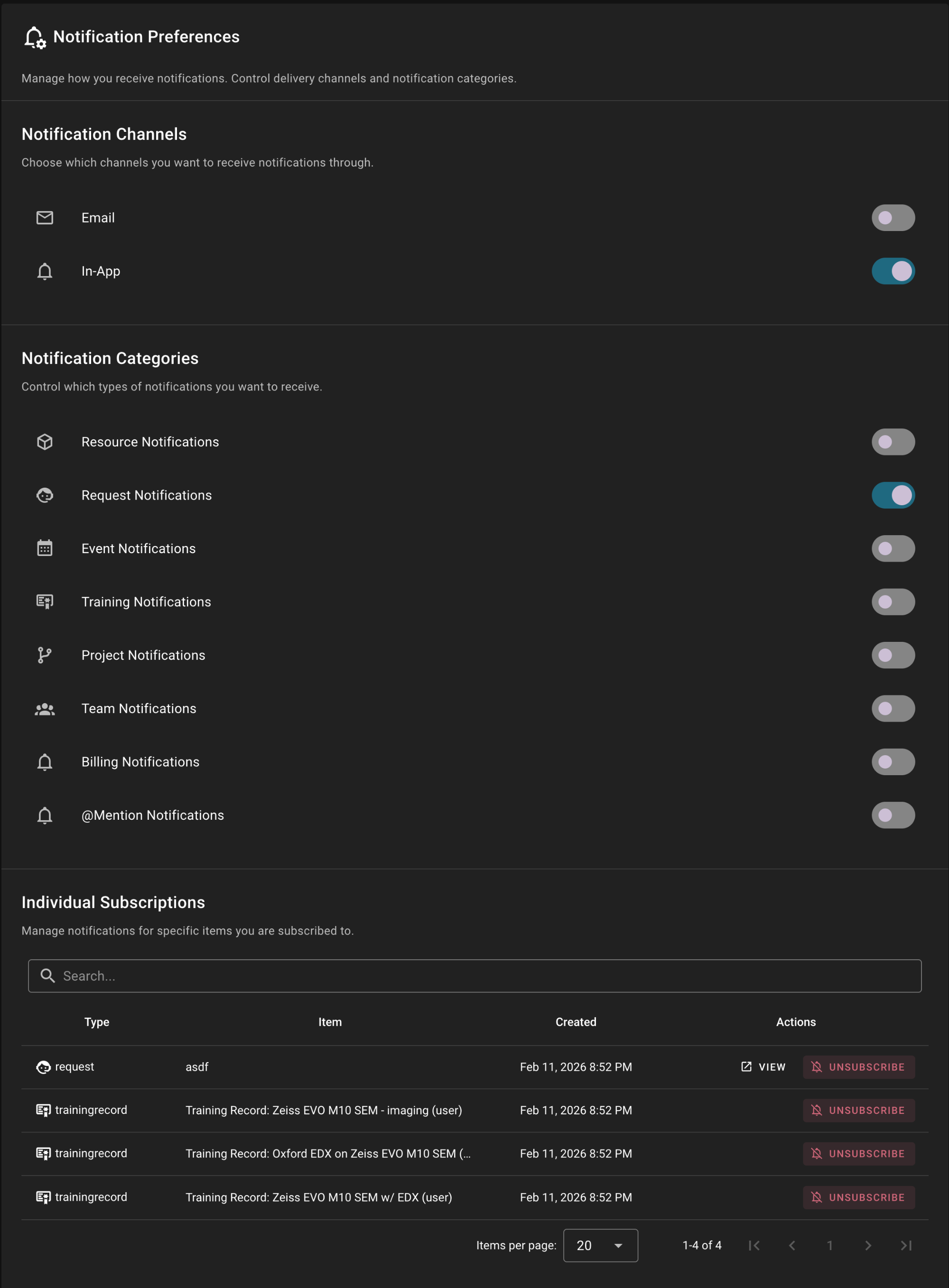
Notifications are controlled at three levels:
- Channels (where notifications are delivered)
- Categories (what types of notifications you receive)
- Individual Subscriptions (specific items you follow)
Understanding how these layers work together ensures you receive only what matters to you.
Notification Hierarchy
Notification Channels
Channels determine where notifications are delivered.
Available channels:
- In-App
If a channel is disabled, you will receive no notifications on that channel — regardless of category or subscription settings.
Important
- You must have at least one channel enabled to receive notifications.
- If all channels are disabled:
- Category toggles become disabled in the UI
- Your category preferences are preserved
- Re-enabling a channel restores your previous settings
Example:
- Email OFF
- In-App ON
→ You will receive notifications in the app only.
In-App Notification Pruning
The system automatically prunes in-app notifications periodically. Typically read notifications are removed after 30, and unread notifications after 90 days. The period may vary my facility. This is to keep your notification center manageable and does not affect email notifications, which are stored in your email inbox.
Notification Categories
Categories control which types of notifications you receive.
Examples include:
- Resource Notifications
- Request Notifications
- Event Notifications
- Training Notifications
- Project Notifications
- Team Notifications
- Billing Notifications
- @Mention Notifications
If a category is disabled, you will not receive notifications of that type — even if you are subscribed to specific items.
Category Resolution Rule
To receive a notification:
- At least one channel must be enabled
- The relevant category must be enabled
- You must be subscribed to the item (if applicable)
If any layer blocks delivery, you will not be notified.
@Mention Notifications (Special Category)
@Mention Notifications
@Mention Notifications are a special category so they are handled differently. They apply across all other categories and do not require subscription to the item. If enabled, you will receive notifications for any direct mentions regardless of other settings.
If this category is enabled:
- You will receive notifications when someone mentions you
- This applies across requests, events, projects, and other objects
- Mentions are delivered regardless of other category settings
- Mentions do not require subscription to the item
Example:
- Request Notifications = OFF
- @Mention Notifications = ON
- Someone mentions you in a request
→ You will still be notified
Mentions are delivered through all enabled channels.
Individual Subscriptions
At the bottom of the preferences page, you can manage specific item subscriptions.
You are automatically subscribed to:
- Requests you create
- Requests you participate in
- Projects you create
- Training records you receive
- Events you create or join
You may unsubscribe from any of these at any time.
How Subscriptions Work
Subscriptions determine whether you receive updates for a specific object.
However:
- If the category is disabled → no notifications are delivered
- If the channel is disabled → no notifications are delivered
- Your subscription list remains visible even if delivery is disabled
This allows you to manage subscriptions proactively without re-enabling categories.
Billing Notifications
Billing notifications are delivered to authorized users based on system permissions.
If enabled, you may receive notifications related to:
- Invoices
- Statements
- Billing updates
Access depends on your role within the team or project.
How the System Decides to Notify You
When an event occurs, Colabmacs evaluates notifications in this order:
- Is at least one channel enabled?
- Is the relevant category enabled?
- Are you subscribed to the item?
- (If applicable) Were you directly mentioned?
If all required conditions are met, the notification is delivered.
Facility Communication
One special caveat - some facility notifications (e.g. facility mass communication) will always be delivered to ensure critical information is received by all users.
Best Practices
- Keep In-App notifications enabled for real-time awareness
- Disable categories you do not actively work in
- Use unsubscribing to reduce noise on high-activity items
- Keep
@Mention Notificationsenabled to avoid missing direct communication
Notification controls allow you to stay informed — without being overwhelmed.