

Projects
Projects are the organizational backbone of work in Colabmacs.
Everything — bookings, usage, training, and charges — happens within the context of a project. Projects allow facilities and teams to track work, allocate costs, and control access in a way that mirrors real-world operations.
If you’re ever unsure where something belongs, the answer is almost always: a project.
What Is a Project?
A project typically represents:
- A research initiative
- A class or course
- A client engagement
- A funded grant or contract
- A personal or internal build
Projects are used to:
- Associate bookings and usage with work
- Track costs and charges
- Apply budgets or expiration limits
- Control participation and access
Every booking and usage record belongs to one project.
Projects, Teams, and Billing
Projects belong to teams.
- Teams are the billable entities
- Projects incur usage and charges
- Charges roll up to the Team Owner
This separation allows teams to manage finances while projects organize day-to-day work.
Switching Between Projects
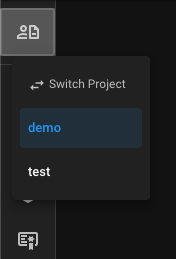
You can switch your active project at any time using the Project Switcher.
How It Works
- Click the project switcher
- Select a project
- The selected project becomes your current project
- This project is used by default for new bookings and usage
(you can override it per booking)
Current Project
Switching your project sets the default project for new bookings or requests. Always confirm you are working in the correct project before continuing.
Active vs Suspended Projects
Projects may become suspended automatically when limits are reached.
Active Projects
- Allow new bookings
- Allow usage sessions
- Accrue charges normally
Suspended Projects
- ❌ New bookings are blocked
- ❌ Usage sessions cannot be started
- ✅ Historical usage and charges remain visible
Projects are automatically re-evaluated by the system.
Extending a budget or expiration date will reactivate the project after the next check.
Roles Within a Project
Access inside a project is controlled by project-scoped roles and permissions.
These roles apply only to the associated project and do not grant system-wide access.
Project Members
Project members typically can:
- Create bookings
- Start usage sessions (if access rules allow)
- View their own usage and charges
Project Managers
Project Managers have a scoped management view of the project.
They can:
- View all project bookings
- View all project users
- View usage records and charges
- Modify or cancel existing bookings
- Start usage sessions from bookings made by other project members
(the user starting the session must still pass all activation rules)
This allows centralized coordination without bypassing training, access rules, or safety requirements.
Info
Project Managers may not see all calendar features available to individual users, but they can manage workflows across many resources within the project.
Budgets & Limits
Projects may have:
- Overall budget limits
- Overall expiration dates
Managers may also apply user-specific limits within a project.
When limits are reached:
- The project (or user) becomes inactive
- New bookings and usage are blocked
- Existing records remain available for reporting
These controls help facilities prevent overruns while keeping work auditable and transparent.
Best Practices
- Use separate projects for distinct bodies of work
- Monitor usage if budgets apply
- Plan ahead for expiration dates
- Communicate early if a project is nearing suspension
- Prefer project-level roles over system-wide access when possible
Projects connect work, access, and billing — understanding them makes the rest of Colabmacs intuitive.