

Access Rules — Detailed Reference
Audience
This page is intended for administrators and facility managers configuring access policies. End users may benefit from understanding these rules, but Access Rules are designed, configured, and enforced by admins.
Executive Summary
Access Rules control who can book, who can activate, and who can cancel reservations for Resources and Processes in Colabmacs.
They are:
- Policy-enforcing (not advisory)
- Stackable — all applicable rules must pass
- Context-aware (time, location, roles, training, infrastructure)
If any rule fails, the action is blocked and the user is presented with an error message explaining why.
Mental Model: How Access Is Decided
User Action (Book / Activate / Cancel)
        ↓
Determine Applicable Rules
        ↓
Evaluate ALL Rules (Logical AND)
        ↓
✓ All pass → Action allowed
✗ Any fail → Action blocked
Key principles:
- Rules are never partially applied
- There is no automatic override
- Failures are logged for auditability
Rule Scope & Precedence
Rules may be applied to:
- Locations (and all sub-locations)
- Resources
- Tags
Precedence Rules
- Location rules apply to all contained resources
- Resource rules may further restrict access
- Resource rules cannot relax location rules
Least Restrictive at Location Level
Location rules should define the least restrictive policy for that location. Individual resources may only add further restrictions.
Time Classification
Each Access Rule can be configured to apply during:
- Business Hours
- After Hours
- Weekends
Important distinctions:
- Weekends are not considered after-hours
- Saturday and Sunday are treated separately
- Rules may apply to any combination of these periods using checkboxes
Role-Based Rule Application
Role Based Rule Application
In addition to the parameters listed for each individual rule below — ALL ACCESS RULES accept the includeRoles and excludeRoles parameters.
These parameters allow rules to be selectively applied or bypassed based to users with system roles, resource team member roles, or roles provided through training.
Using both include and exclude roles in the same rule is not recommended; however, if both are specified, the excludeRoles parameter is evaluated first.
Avoid Name Collisions With Roles
In order to avoid confusion, it is recommended to avoid name collisions between various role scopes. For example, avoid creating a provided role and global role named maintenance. Prefixing globals roles is a common strategy to avoid collisions, e.g. facility-maintenance.
Role Exclusion & Inclusion Precedence
- If a user has a role listed in excludeRoles, the rule is not applied to that user
- If a user has a valid Training Record that provides a role listed in excludeRoles, the rule is not applied to that user
- If a user has a role listed in includeRoles, the rule is applied to that user
- If a user has roles listed in both, the excludeRoles takes precedence
- If neither parameter is specified, the rule applies to all users
Role Naming Rules
- Role names must not include spaces
- Use
slug-format-namesfor multi-word roles
Multiple Role Formats
| Separation | Example |
|---|---|
| Space | role1 role2 role3 |
| Comma | role1, role2, role3 |
| Pipe | role1 | role2 | role3 |
How includeRoles / excludeRoles Work
- includeRoles
Rule applies only to users with at least one listed role - excludeRoles
Rule applies to everyone except users with listed roles
If neither is specified, the rule applies to all users.
Rule Lifecycle
| Rule Type | Evaluated When |
|---|---|
| Booking Rules | Reservation creation |
| Activation Rules | Session activation |
| Cancellation Rules | Cancellation or modification |
Defining Rules
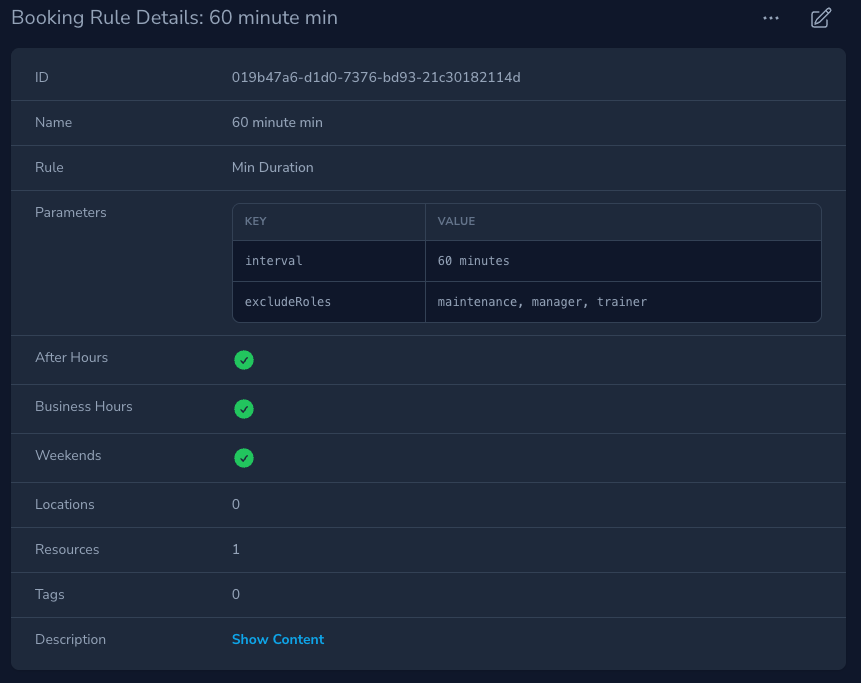
Rules are defined in the Access Rules section of the Admin UI. Parameters for each rule are added as key-value pairs, and rules can be combined to enforce complex policies.
Activation Rules
Warning
Activation Rules are enforced when a user attempts to start a session.
Activation Rules — Summary Table
| Rule | Parameters |
|---|---|
| Buddy Required | minimum |
| Enforce Schedule Period | delay, startBuffer, endBuffer |
| Enforce Valid Training | — |
| Enforce Valid Process Training | — |
| Infrastructure Is Operational | strict |
| Location Capacity Limit | delay, maximum, startBuffer, endBuffer |
| Requested Configuration Is Current | — |
| Restrict Concurrent Use | maximum |
| Enforce Event State | — |
Buddy Required
Parameters: minimum
Requires a minimum number of other users to be present in the associated location before activation.
Resource Setting Required
This rule is only evaluated for resources where Buddy Required is true.
Example:
minimum = 1
User attempts activation alone → Blocked
Enforce Schedule Period
Parameters: delay, startBuffer, endBuffer
Ensures sessions are only activated within the reserved time window, optionally allowing early or late activation using buffers.
Enforce Valid Training
Parameters: none
Ensures all required training for the resource and location exists and is unexpired at activation time.
Enforce Valid Process Training
Parameters: none
Ensures required training for a selected process is valid. Only evaluated if a process was selected during event creation.
Infrastructure Is Operational
Parameters: strict
Ensures all infrastructure is currently operational at activation time. Used to catch unexpected or unplanned outages.
Location Capacity Limit
Parameters: delay, maximum, startBuffer, endBuffer
Blocks activation if starting the session would exceed the location’s capacity.
Requested Configuration Is Current
Parameters: none
Ensures requested resource configurations still exist at activation time. Does not enforce notice requirements.
Restrict Concurrent Use
Parameters: maximum
Limits the number of concurrent active sessions for a resource.
Enforce Event State
Parameters: none
Ensures the reservation is in a valid activatable state: confirmed, late, or active.
Booking Rules
Warning
Booking Rules are enforced when a user attempts to create a reservation.
Booking Rules — Summary Table
| Rule | Parameters |
|---|---|
| Does Not Overlap | delay, startBuffer, endBuffer, excludeStates |
| Enforce Resource State | — |
| End In Business Hours | delay |
| Enforce Infrastructure Schedule | strict |
| Enforce Schedule | available, startBuffer, endBuffer |
| Enforce Project Budget | threshold |
| Enforce Valid Training | — |
| Enforce Valid Process Training | — |
| Infrastructure Is Currently Operational | strict |
| In The Future | delay, interval |
| Location Capacity Limit | delay, maximum, startBuffer, endBuffer |
| Max Duration | delay, interval |
| Max Per Day | delay, maximum |
| Min Duration | delay, interval |
| Require Valid Project | — |
| Start In Business Hours | delay |
| Sufficient Configuration Notice | delay |
| Within Business Hours | delay |
| Within Horizon | delay, offset, round, interval |
| Within Quota Limit | delay, interval, quota |
Does Not Overlap
Parameters: delay, startBuffer, endBuffer, excludeStates
Prevents overlapping reservations, optionally applying buffers before or after events.
The optional excludeStates parameter lets you ignore one or more event states when checking for overlaps.
This is especially useful with Finish & Release Booking workflows.
Example:
excludeStates = finishedWith this configuration, bookings already marked Finished are not included in the overlap check.
Example Use Case: Rebooking Released Time
Suppose a facility allows users to finish and release a booking early.
Without excludeStates = finished:
- The original event still occupies its original time window
- New bookings during that remaining time are blocked as overlapping
With excludeStates = finished:
- Finished events are ignored by
Does Not Overlap - A new booking can be created in the remaining released time
This pattern works well for high-demand resources where early release should make unused time available to others.
Enforce Resource State
Parameters: none
Blocks booking if the resource is unavailable, or if its Resource Type does not allow booking.
End In Business Hours
Parameters: delay
Ensures the reservation end time falls within the resource business hours window.
Start In Business Hours
Parameters: delay
Ensures the reservation start time falls within the resource business hours window.
Within Business Hours
Parameters: delay
Ensures the entire reservation falls within business hours. For this rule to pass, the booking must be contained within a single day.
Enforce Infrastructure Schedule
Parameters: strict
Prevents bookings during scheduled future infrastructure outages. This differs from Infrastructure Is Currently Operational, which checks current state.
Enforce Schedule
Parameters: available, startBuffer, endBuffer
Determines whether the reservation must be within an available schedule window or must avoid unavailable schedule windows.
Enforce Project Budget
Parameters: threshold
Prevents bookings that would exceed the project, or project user’s budget threshold. The rule will check the budget at booking time, and estimate the generated charge presuming that the user will generate a usage record for the full duration of the reservation. If there is no matching rate for the associated project or resource, the rule will not block the booking.
Enforce Valid Training
Parameters: none
Ensures all required training for the resource and location is valid (exists and unexpired) at booking time.
Enforce Valid Process Training
Parameters: none
Ensures process training is valid, but only if a process is selected during booking.
Infrastructure Is Currently Operational
Parameters: strict
Blocks booking if required infrastructure is currently unavailable at booking time.
In The Future
Ensures the reservation period starts in the future. If provided, interval specifies how far in the future the booking must be.
Location Capacity Limit
Parameters: delay, maximum, startBuffer, endBuffer
Prevents bookings that would exceed location capacity during the requested period. Use buffers to adjust the effective window asymmetrically.
Max Duration
Ensures the booking duration is less than or equal to the maximum interval.
Min Duration
Ensures the booking duration is greater than or equal to the minimum interval.
Max Per Day
Limits the number of reservations a user or project can make for a resource per day. Use the rule attribute selection (e.g. user_id or project_id) to control which entity is limited.
Require Valid Project
Parameters: none
Ensures a valid project is provided and is currently active/eligible for booking.
Sufficient Configuration Notice
Parameters: delay
Ensures sufficient notice is provided when requesting a configuration change, based on configuration settings.
Within Horizon
Parameters: delay, offset, round, interval
Restricts how far into the future reservations may be created. The booking end time must fall within the computed horizon.
Within Quota Limit
Parameters: delay, interval, quota
Ensures the reservation will not exceed a configured quota for the user or project within the given interval.
Cancellation Rules
Warning
Cancellation Rules are enforced when a reservation is cancelled or modified.
Cancellation Rules — Summary Table
| Rule | Parameters |
|---|---|
| Beyond Horizon | offset, round, interval |
| Do Not Allow Cancellation | — |
| Enforce Event State | — |
Beyond Horizon
Parameters: offset, round, interval
Restricts cancellations unless the reservation start time falls beyond a computed horizon.
Do Not Allow Cancellation
Parameters: none
Disables cancellations completely.
Enforce Event State
Parameters: none
Restricts cancellation to specific event states.
Exclusion & Inclusion Examples
Example: Admin Bypass via excludeRoles
excludeRoles = adminAdmins bypass the rule; all other roles are restricted.
Example: Only Certified Users Can Book
includeRoles = certified-userOnly users with certified-user (provided through training) have the rule applied.
Access Rule Scenarios
Info
The following examples demonstrate how Access Rules can be combined to enforce real-world facility policies. These scenarios are intended for administrators and facility managers configuring access behavior.
Scenario 1: Business-Hours Tool With Weekend Flexibility and After-Hours Access
Scenario
A tool is available during business hours with a minimum booking of 30 minutes and a maximum of 4 hours.
On weekends, the 4-hour maximum does not apply.
Users with the after-hours role may book outside business hours.
Rules Required
Booking Rules (Applied to the Resource)
Min Duration
interval = 30 minutes
Apply during: Business Hours, After Hours, Weekends
Max Duration (Business Hours only)
interval = 4 hours
Apply during: Business Hours
Within Business Hours
Apply during: Business Hours
excludeRoles = after-hours
In The Future (optional)
interval = 15 minutesWhy This Works
- The maximum duration rule only applies during business hours
- Weekend bookings are unrestricted
- Users with the
after-hoursrole bypass business-hour restrictions - Minimum duration applies consistently across all time periods
Scenario 2: Tool With Training, Concurrency Limits, and Vacation Schedule
Scenario
A tool:
- Allows up to 3 concurrent users
- Requires valid training
- Cannot be booked during scheduled vacation closures
- Blocks activation during unexpected outages
Rules Required
Booking Rules (Applied to the Resource)
Restrict Concurrent Use
maximum = 3Enforce Valid Training
(no parameters)Enforce Infrastructure Schedule
strict = trueActivation Rules (Applied to the Resource)
Infrastructure Is Operational
strict = trueWhy This Works
- Scheduled outages prevent bookings in advance
- Unexpected outages are caught at activation time
- Concurrency is enforced at session start
- Training is validated at both booking and activation
Scenario 3: 24×7 Location With Capacity Limits and Tool-Specific Duration Caps
Scenario
A location is open 24×7.
All equipment requires valid training.
The location has a capacity limit of 25 people.
There is a global 6-hour maximum booking for the location, but a special tool is limited to 2 hours.
Rules Required
Location-Level Booking Rules
Enforce Valid Training
(no parameters)Location Capacity Limit
maximum = 25Max Duration (Location-wide)
interval = 6 hoursResource-Level Booking Rules (Special Tool Only)
Max Duration
interval = 2 hoursWhy This Works
- Location rules establish the least restrictive baseline
- Resource-level rules further restrict without relaxing location rules
- Capacity limits apply uniformly across the location
- 24×7 availability is implicit by omitting business-hour rules
Rule Parameters Reference
Additional Resources
For detailed parameter definitions, formats, and examples, see: