

Admin Dashboard
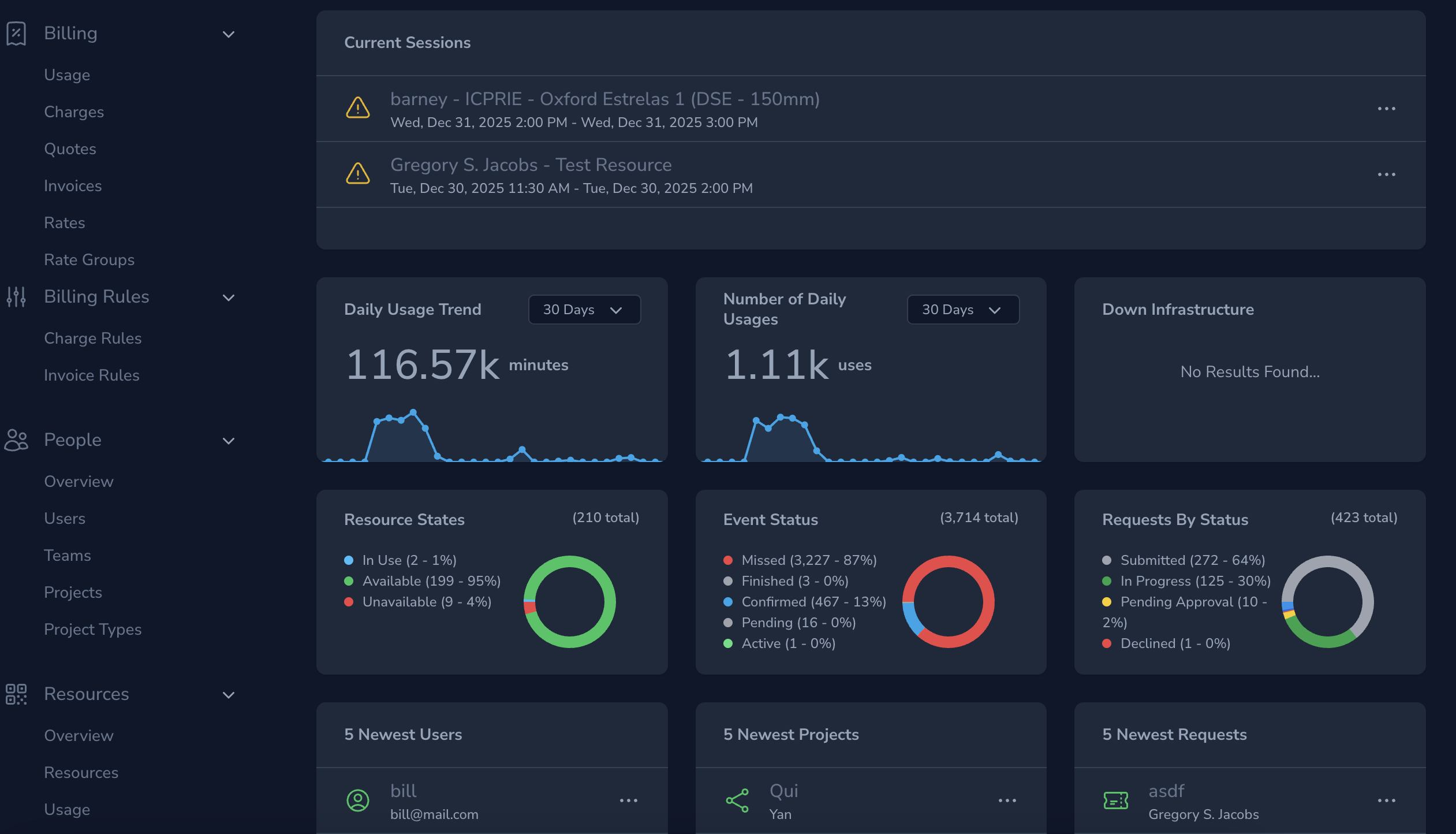
The Admin Dashboard is the operational command center for facility managers and system administrators.
It provides a high-level, real-time overview of what is happening across your facility so you can quickly assess activity, identify issues, and decide where attention is needed.
Rather than replacing detailed reports or configuration pages, the dashboard is designed to answer one core question:
“How is my facility doing right now?”
What the Admin Dashboard Is For
The dashboard is optimized for situational awareness, not deep configuration. It helps you:
- Monitor overall facility activity at a glance
- Spot unusual usage patterns or downtime quickly
- Stay aware of recent changes (new users, new projects)
- Identify areas that may need follow-up or investigation
From here, you can drill down into specific sections of the system when something requires action.
Key Dashboard Sections
Daily Usage Trend
The Daily Usage Trend provides a visual heatmap of resource usage over time.
This view helps you:
- Identify peak usage periods
- Spot underutilized days or times
- Recognize seasonal or cyclical demand patterns
- Validate whether access rules and schedules align with actual usage
This trend is especially useful for:
- Capacity planning
- Staffing decisions
- Maintenance scheduling
Number of Daily Usages
This metric shows the total number of usage sessions recorded per day.
It gives you:
- A quick quantitative measure of daily activity
- An easy way to compare day-to-day or week-to-week usage
- A signal when activity suddenly spikes or drops
If this number changes unexpectedly, it’s often a cue to review:
- Resource availability
- Project activity
- Training or access constraints
Down Infrastructure
The Down Infrastructure panel highlights infrastructure components that are currently unavailable.
This allows you to:
- Immediately see what may be impacting multiple resources
- Prioritize response to critical dependencies
- Reduce cascading downtime across locations
This section is especially important because infrastructure outages can:
- Block bookings
- Prevent sessions from starting
- Automatically cancel active or upcoming usage
Newest Users
The Newest Users section shows the most recently added users in your system.
This helps you:
- Track onboarding activity
- Verify successful user imports or invitations
- Anticipate upcoming training or access requests
It’s a quick way to stay aware of growth and new demand entering the facility.
Newest Projects
The Newest Projects panel highlights recently created projects.
This is useful for:
- Monitoring new work entering the system
- Identifying projects that may require rate, budget, or access review
- Anticipating increased resource demand
New projects often correlate with:
- Increased booking activity
- New training requests
- Changes in usage patterns
Lenses and Filters
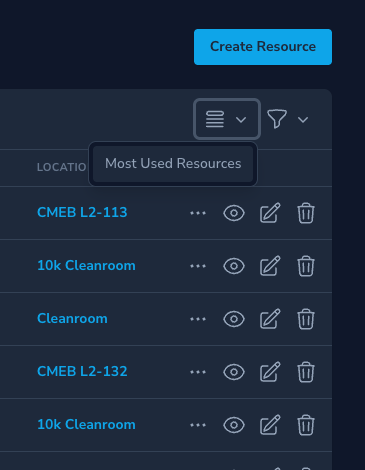
The Admin Dashboard supports lenses and filters to view slices of key data in different ways. You can use lenses such as Top Usage or Most Used Resources to focus on specific aspects of your facility's activity. The lens icon in the top-right corner of each section allows you to select different lenses.
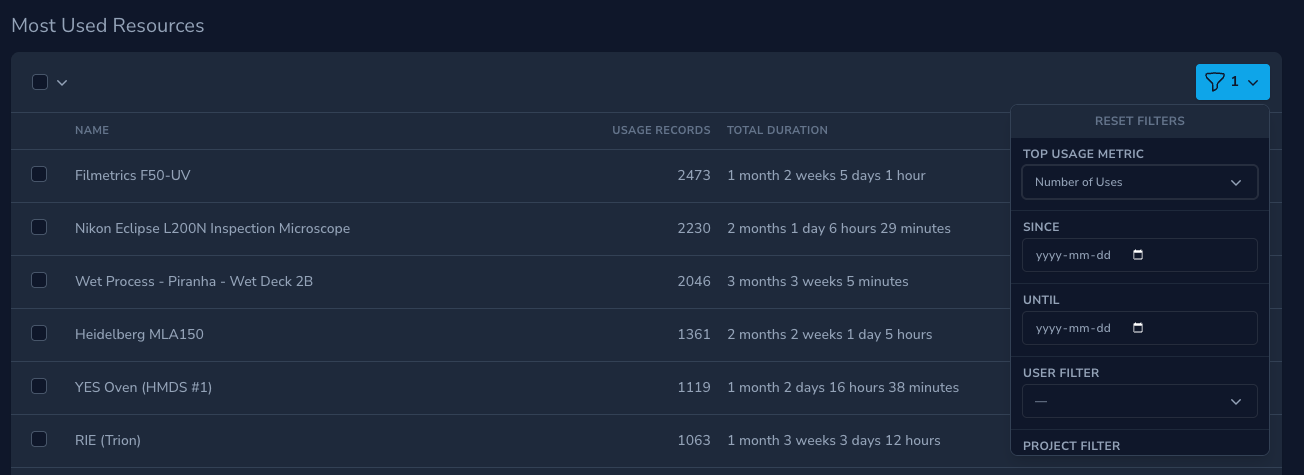
From the lens view, you can use additional filters to sort, and order the data based on your needs. This helps you quickly identify trends or outliers in resource usage, user activity, or project creation.
How to Use the Dashboard Effectively
The Admin Dashboard works best when used as a starting point, not an endpoint.
A typical workflow might look like:
- Review the dashboard at the start of the day
- Identify anything unusual (spikes, outages, new activity)
- Navigate to the relevant section (Resources, Usage Records, Requests, Projects)
- Take action where needed
Think of the dashboard as your daily operational briefing.
Related Admin Topics
- Resources — manage availability, rules, and dependencies
- Usage Records — detailed usage and charge tracking
- Requests — user communication and workflow
- Training & Access — control who can do what
- Projects — structure work, budgets, and billing
The Admin Dashboard helps you stay informed without being overwhelmed — giving you the confidence that your facility is running smoothly, or the visibility to act quickly when it isn’t.