

Usage Records
Usage Records provide you with a complete history of your activity in the facility.
Any time you use a resource, run a process, or complete a configuration that tracks time or quantity, Colabmacs creates a Usage Record. These records show what was used, when it was used, how long it was used for, and whether a charge was generated.
Usage Records are your primary reference for:
- Reviewing past work
- Understanding how time was measured
- Tracking costs
- Verifying billing accuracy
What Is a Usage Record?
A Usage Record represents the actual usage of something in the facility.
Usage Records can be created for:
- Resources (equipment, rooms, tools)
- Processes (defined workflows or steps)
- Configurations (special setup or operating modes)
In most cases, a Usage Record is created when you start and finish a usage session tied to a booking.
Important:
- A booking reserves time.
- A usage session records what actually happened.
- A usage record is the permanent result.
- A charge may be generated from the usage record.
How Usage Records Are Created
Most usage records follow this flow:
- You create a booking
- The booking becomes active
- You start a usage session
- You finish the session
- A Usage Record is generated
If billing is enabled, the usage record may also generate a Charge.
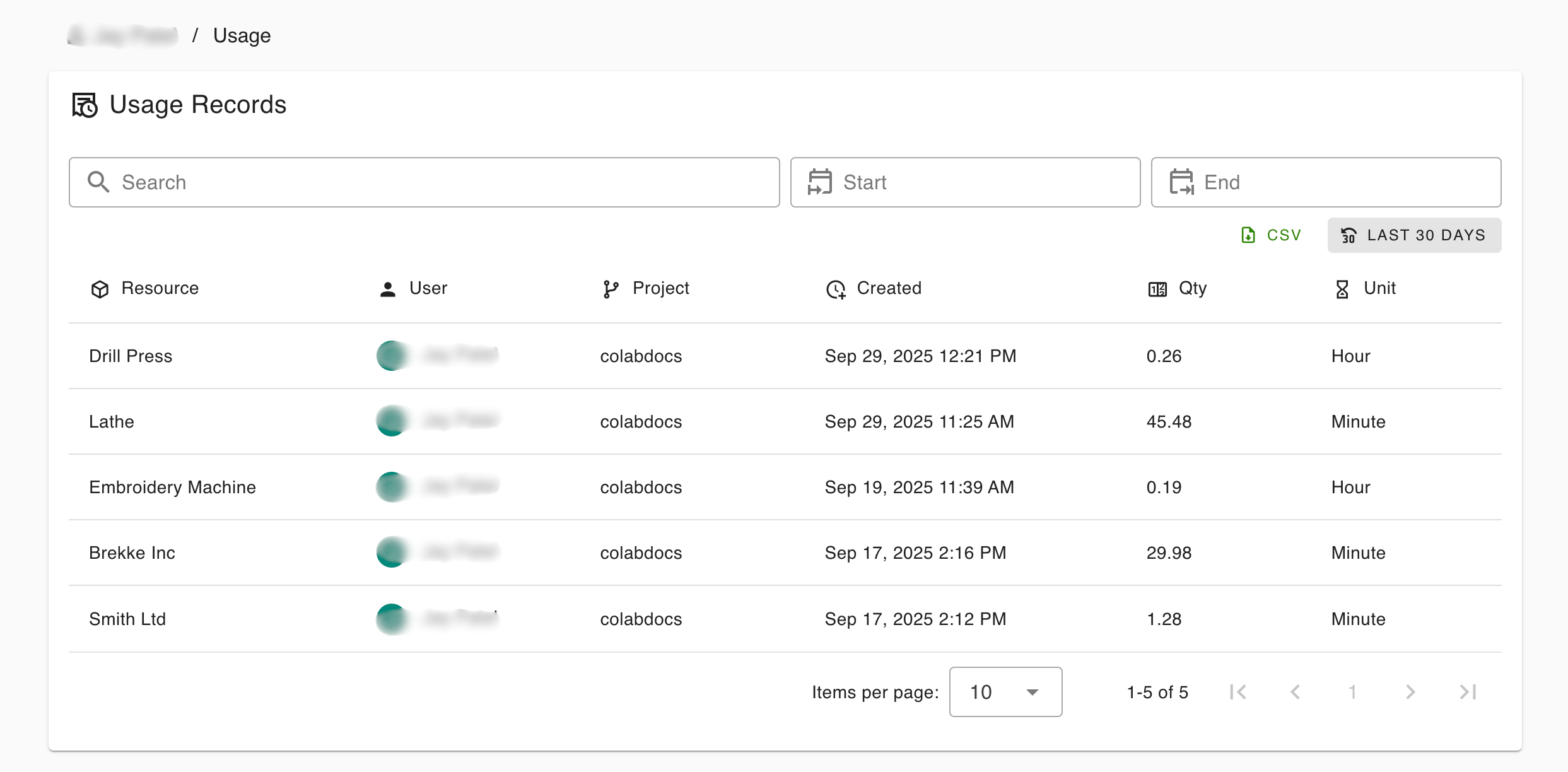
Viewing Your Usage Records
Navigate to Usage Records from the main menu or dashboard.
You will see a list of your recorded usage, including:
- What was used
- Which project it was associated with
- When it occurred
- How much usage was recorded
- The unit of measurement
Filtering and Searching
You can quickly narrow down your usage history using the tools at the top of the page.
Search
Use the search bar to filter by:
- Resource name
- Project name
- Your name (for shared views)
Date Range
- Start Date – Show usage after a specific date
- End Date – Show usage before a specific date
- Last 30 Days – Quick filter for recent activity
Filters update the list automatically.
Understanding the Usage Table
Each row represents one usage record.
| Column | What It Means |
|---|---|
| Resource | The resource, process, or configuration that was used |
| User | Who performed the usage |
| Project | The project the usage was recorded against |
| Created | When the usage record was created |
| Qty | The amount of usage recorded |
| Unit | The measurement unit (hours, minutes, etc.) |
Viewing Usage Details
Click on any row to open the Usage Details panel.
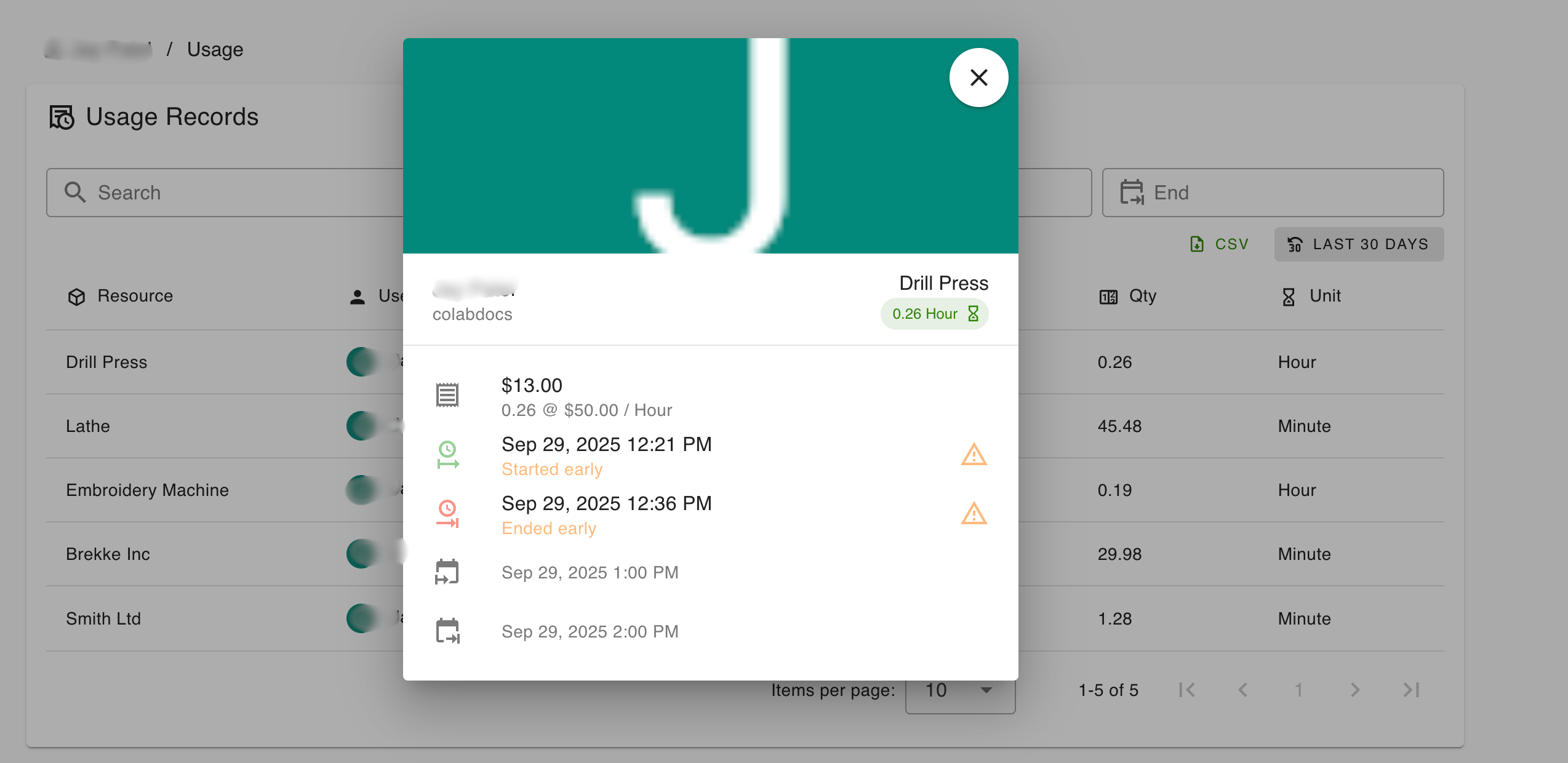
This view gives you a complete breakdown of the usage.
Usage Summary
At the top of the detail view you’ll see:
- Resource name
- Project name
- Total usage (quantity + unit)
- Completion status
This confirms that the usage session was successfully completed.
Timing Details
Usage records include both scheduled time and actual time.
Actual Usage
- When the session started
- When the session ended
- How long it actually ran
Scheduled Booking
- Original booking start time
- Original booking end time
If usage started or ended early, Colabmacs will clearly indicate this.
Why this matters:
Charges are based on actual usage, not reserved time.
Charges and Costs
If the resource, process, or configuration has a rate assigned, the usage record may generate a Charge.
You’ll see:
- Total cost
- Rate used (e.g.
$50 / hour) - Calculation breakdown
Example: 0.26 hours × $50.00 / hour = $13.00
If no rate applies, the usage record will still exist — just without a charge.
Exporting Usage Records
You can export usage records at any time.
CSV Export
- Apply filters (optional)
- Select all entries or desired entries
- Selected download CSV from actions menu
- Download a spreadsheet containing the visible records
Exports respect:
- Search filters
- Date range filters
Common Reasons to Export
- Project cost tracking
- Expense reporting
- Billing review
- Personal records
Common Use Cases
Review Your Activity
Check what you’ve used recently and how long sessions lasted.
Verify Charges
Confirm that billed time matches actual usage.
Project Reporting
See how much facility time a project has consumed.
Resolve Questions
Usage records provide an audit trail if something looks incorrect.
Best Practices for Users
- Start sessions only when you are ready to use the resource
- End sessions promptly when finished
- Always select the correct project
- Review usage records regularly
- Report discrepancies early
Usage Records exist to protect you as much as the facility.
Related Topics
Usage Records are your historical record of work — accurate, transparent, and always available.