

Billing Rules (Advanced)
Billing Rules automatically adjust charges, invoice totals, or statement totals while preserving the original usage data.
All rule applications are logged for auditability, traceability, and financial review.
Rule Scope & Targeting
Group, Project, or Project Type Based Rule Application
In addition to the parameters listed for each individual rule below, all billing rules accept the following targeting parameters:
includeTeamsexcludeTeamsincludeProjectsexcludeProjectsincludeProjectTypesexcludeProjectTypes
These parameters allow rules to be applied selectively based on the Team, Project, or Project Type associated with a Charge or Invoice.
When generating a Statement, only includeTeams and excludeTeams are applicable, as statements are team-level aggregates.
Using both include and exclude parameters in the same rule may produce unexpected results.
Best Practice
Avoid mixing include and exclude parameters within the same rule. Prefer a single, explicit targeting strategy.
Adjustments (Important Concept)
All billable entities store both:
raw_total— calculated purely from usage and ratestotal— the final value after all billing rules are applied
The adjustment column represents the difference:
adjustment = total - raw_totalKey points:
- Adjustments are computed automatically
- Adjustments may be positive or negative
- Adjustment fields are read-only
- Raw totals are never modified
- Adjustments can be found on Charges, Invoices, and Statements
Examples:
- Minimum billing → positive adjustment
- Caps or discounts → negative adjustment
This ensures full financial transparency while supporting advanced billing models.
Defining Rules
Rules are defined in the Billing Rules section of the Admin UI. Parameters for each rule are added as key-value pairs, and rules can be combined to enforce complex policies.
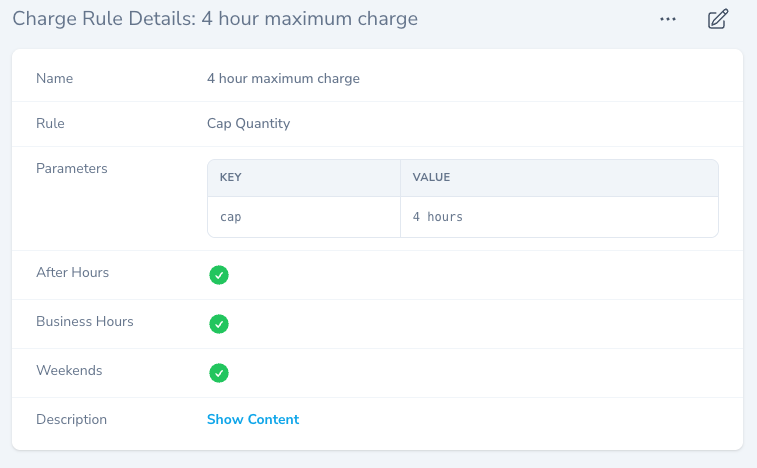
Charge Rules — Detailed Behavior
Charge Rules Timing
Charge Rules are evaluated at the moment a Charge is generated from a Usage Record.
They modify the billed quantity only — actual usage is always preserved.
Charge rules apply only to time-based units (Minute, Hour, Day).
Supported Charge Rules
| Rule | Description | Parameters |
|---|---|---|
| Add Base Fee | Add a base fee to the charge total | amount |
| Cap Quantity | Maximum quantity charged | cap |
| Cap Per Interval | Caps usage per time interval | cap interval |
| Min Quantity | Enforces a minimum charge | minimum |
| Round Up to Booking | Bills booked time instead of actual | |
| Scale Quantity | Scales quantity by a factor | factor threshold |
| Grace Period | Skips charges below threshold | grace |
Charge Rules may be applied by Resource, Process, Configuration, Training, Rate, Rate Group, or Tag. They may also be scoped by Team, Project, or Project Type using the targeting parameters described above.
Tag-Based Charge Rules
When a Usage Record has one or more Tags, any Charge Rules attached to those Tags are included when the Charge is generated.
This makes it possible to target specific groups of usage records without changing the Project, Rate Group, or underlying billable setup.
When applying multiple rules, the result will be the minimum value after all rules are applied.
Common use case:
Create a Tag such as in-kind, attach it to selected Usage Records, and attach a Charge Rule such as Cap Quantity = 0 hours to that Tag. This preserves the full Usage Record history on the Project while producing a zero-value Charge for tagged usage.
Add Base Fee (Charges)
Parameters: amount
Purpose:
Add a base fee to a charge, regardless of usage. Note that negative amounts are also supported, allowing for fixed discounts.
How it works:
A fixed amount is added to the charge total after usage-based calculations.
- The base fee is independent of usage
- It is added after all quantity-based rules are applied
Typical use cases:
- Access fees
- Setup fees
- Membership fees
Example:
amount = $5
usage = 2 hours @ $10/hour = $20
raw total = $20
total = $25
adjustment = +$5
Cap Quantity
Parameters: cap
Purpose:
Limits the maximum quantity that can be billed for a single charge. Cap is an interval string (for example, "8 hours") that specifies the maximum billable quantity for a charge, regardless of actual usage.
How it works:
If the actual usage exceeds the specified cap, the billed quantity is reduced to the cap value.
- The cap is evaluated after unit conversion
- Actual usage is retained, but billing is limited
Typical use cases:
- Daily maximum billable hours
- Flat-rate caps for long-running usage
- Preventing runaway billing
Example:
cap = 8 hours
actual quantity = 10 hours
billed quantity = 8 hours
Cap Quantity Per Interval
Purpose:
Caps billable quantity per repeating time interval, rather than globally.
How it works:
Usage is segmented into intervals (for example, days), and the cap is applied independently to each interval.
- Remaining partial intervals are billed at actual usage
- Useful for multi-day usage records
Typical use cases:
- Maximum billable hours per day
- Shift-based billing limits
- Long bookings spanning multiple days
Example:
cap = 8 hours
interval = 1 day
Usage = 76 hours over 4 days

Billed Quantity:
Day 1: 8 hours
Day 2: 8 hours
Day 3: 8 hours
Day 4: 4 hours
Total Billed = 28 hours
Min Quantity
Parameters: minimum
Purpose:
Ensures a minimum charge is generated, even for short usage periods.
How it works:
If the actual usage is less than the minimum, the billed quantity is raised to the minimum value.
- Actual usage remains unchanged
- Billing reflects the minimum commitment
Typical use cases:
- Minimum booking durations
- Setup or access minimums
- Preventing micro-charges
Example:
minimum = 1 hour

actual quantity = 15 minutes
billed quantity = 1 hour
Round Up To Booking Time
Purpose:
Ensures users are billed for what was booked, not just what was used.
How it works:
The billed quantity becomes the greater of:
- Actual usage
- Booked duration
This rule compares usage against the associated booking record.
Typical use cases:
- Reserved equipment
- High-demand shared resources
- Discouraging early release abuse
Example:
booked = 2 hours

actual quantity = 1.25 hours
billed quantity = 2 hours
Scale Quantity
Purpose:
Applies a scaling factor to the billed quantity, optionally after a specified threshold. This allows for percentage-based adjustments to charges, such as discounts or penalties.
How it works:
- If a threshold is provided, scaling is applied only to the amount of usage that exceeds the threshold
- If no threshold is provided, scaling always applies
- Scaling occurs before final billing
Typical use cases:
- Partial discounts on overages
- Graduated billing
- Penalty or incentive models
Example:
factor = 0.5

actual quantity = 12 hours
billed quantity = 6 hours
factor = 0.5
threshold = 8 hours
actual quantity = 12 hours
billed quantity = 10 hours (8 hours + (4 hours * 0.5))Grace Period
Parameters: grace
Purpose:
Prevents billing for very short usage periods.
How it works:
If the actual usage is less than the grace period, no charge is generated.
- No charge record is created
- Usage remains visible for analytics
Typical use cases:
- Short test usage
- Accidental starts
- Tolerance windows
Example:
grace = 15 minutes

Usage = 10 minutes → No charge generated
Usage = 20 minutes → Charged normally
Invoice Rules — Detailed Behavior
Invoice Rules Timing
Invoice Rules are evaluated only when an Invoice is generated.
They modify the final invoice total, not individual charges.
Supported Invoice Rules
| Rule | Description | Parameters |
|---|---|---|
| Add Base Fee | Add a base fee to the invoice total | amount |
| Cap Total | Cap invoice total (up to an optional maximum threshold) | cap maximum |
| Scale Total | Scales invoice total | factor threshold |
| Cap By Billable Type | Caps selected charges by billable type | cap maximum includeBillableTypes excludeBillableTypes |
| Scale Total By Billable Type | Scales selected charges by billable type | factor threshold includeBillableTypes excludeBillableTypes |
Invoice Totals
Invoice totals may not equal the sum of charges when invoice rules are applied. The difference is captured in the adjustment field for transparency. This is by design to allow for financial adjustments while preserving charge integrity.
Invoice rules may be applied directly to Teams, Projects, Project Types, or Tags. When applying multiple rules, the result will be the minimum value after all rules are applied.
Add Base Fee
Parameters: amount
Purpose:
Add a base fee to an Invoice (or Statement), regardless of the total. Note that negative amounts are also supported, allowing for fixed discounts.
How it works:
A fixed amount is added to the invoice total.
- The base fee is independent of the sum of charges
Typical use cases:
- Monthly account fees
- Service fees
- Support fees
Example:
amount = $100

raw_total = $1,000 (charges total)
total = $1,100
adjustment = +$100
Cap Total
Purpose:
Caps the final total of an Invoice (or Statement).
How it works:
Apply a cap if the total is between the cap and the maximum.
Enforces a ceiling on Invoice/Statement total. If the sum of all charges exceeds the specified cap, the total is reduced to the cap. This rule supports an optional maximum parameter that defines the upper limit for the cap. If the total exceeds the maximum, the cap is no longer applied and the total remains unchanged.
- Individual charges are unchanged
- The invoice reflects the capped total
Typical use cases:
- Contractual maximums
- Fixed-price agreements
- Budget enforcement
Example:
cap = $10,000

raw total = $2,500 (charges total)
total = $2,500
adjustment = $0
cap = $10,000
raw total = $12,500 (charges total)
total = $10,000
adjustment = -$2,500cap = $10,000
maximum = $15,000
raw total = $17,500 (charges total)
total = $17,500
adjustment = $0Maximum vs Cap Logic
The maximum parameter serves as an upper threshold for the cap. If the total exceeds the maximum, the cap is effectively disabled, and the total remains unchanged. In order for this to work, the maximum must be greater than the cap.
If the maximum is less than or equal to the cap, the maximum will have no effect.
Scale Total
Purpose:
Applies a percentage adjustment to the Invoice (or Statement) total, optionally after a threshold.
How it works:
- If a threshold is provided, scaling applies only to the amount that exceeds the threshold.
- If no threshold is provided, scaling always applies
- Scaling occurs after all charges are summed
Important:
Scaling may still result in a total greater than the threshold, depending on configuration.
factor = 0.8

raw total = $5,000 (charges total)
total = $4,000
adjustment = -$1,000
factor = 0.5
threshold = $10,000
raw total = $15,000 (charges total)
total = $12,500 ($10,000 + ($5, 000 * 0.5))
adjustment = -$2,500Total Rules vs By Billable Type Rules
Cap Total and Scale Total operate on the final Invoice or Statement total as a single number.
Cap By Billable Type and Scale Total By Billable Type first select the underlying Charges using includeBillableTypes and excludeBillableTypes, then apply the cap or scaling only to that selected subtotal. The final adjustment is still recorded on the Invoice or Statement, but it is derived from the targeted charges rather than the full total.
Cap By Billable Type
Cap By Billable Type
The Cap By Billable Type rule allows for more granular control over caps by including or excluding specific billable types from the cap calculation. This is particularly useful for organizations that want to apply caps only to certain categories of charges, such as Resource usage, while allowing other types, like Materials or Processes, to be billed without restriction.
Scoping: includeBillableTypes excludeBillableTypes
Use the includeBillableTypes and excludeBillableTypes parameters to specify which billable types are included or excluded from the cap calculation. If no billable types are specified, the rule behaves the same as Cap Total, applying to all types.
Purpose:
Apply a cap if the total is between the cap and the maximum for specific billable types (for example, only Resource charges).
How it works:
- If
includeBillableTypesis specified, only charges matching those types are included in the cap calculation, otherwise all types are included by default - If
excludeBillableTypesis specified, charges matching those types are excluded from the cap calculation - The cap is applied to the sum of included charges, and the Invoice or Statement total is adjusted accordingly
- This allows for targeted caps without affecting other charge types
Examples: Cap By Billable Type
Using excludeBillableTypes to exclude Materials from the cap:
cap = 5000
excludeBillableTypes = Material

resource total = $6,000 (included in cap)
process total = $2,000 (included in cap)
material total = $4,000 (excluded from cap)

total = $9,000
adjustment = -$3,000
Using excludeBillableTypes to exclude Materials from the cap and a maximum threshold:
cap = 5000
maximum = 7000
excludeBillableTypes = Material

resource total = $6,000 (included in cap)
process total = $3,000 (included in cap)
material total = $2,000 (excluded from cap)

total = $11,000 (maximum exceeded)
adjustment = $0
Using includeBillableTypes to include only Resources in the cap:
cap = 5000
includeBillableTypes = Resource

resource total = $6,000 (included in cap)
material total = $3,000 (excluded from cap)
process total = $2,000 (excluded from cap)

total = $10,000
adjustment = -$1,000
Scale Total By Billable Type
Scale Total By Billable Type
The Scale Total By Billable Type rule applies the same threshold-and-factor behavior as Scale Total, but only to the selected billable types. This is useful when you want to discount or reduce only part of an Invoice or Statement total, while leaving other charge categories unchanged.
Scoping: includeBillableTypes excludeBillableTypes
Use the includeBillableTypes and excludeBillableTypes parameters to specify which billable types are included or excluded from the scaling calculation. If no billable types are specified, the rule behaves the same as Scale Total, applying to all types.
Purpose:
Apply threshold-based scaling only to specific billable types within an Invoice or Statement.
How it works:
- If
includeBillableTypesis specified, only charges matching those types are included in the scaling calculation - If
excludeBillableTypesis specified, charges matching those types are excluded from the scaling calculation - The selected subtotal is compared to the
threshold - If the selected subtotal exceeds the threshold, only the amount above the threshold is scaled by the
factor - Charges outside the selected billable types remain unchanged
Examples: Scale Total By Billable Type
Using includeBillableTypes to scale only Resource charges:
factor = 0.5
threshold = 500
includeBillableTypes = Resource

resource total = $800 (included in scaling)
training total = $400 (excluded from scaling)

scaled resource total = $650 ($500 + ($300 * 0.5))
final total = $1,050
adjustment = -$150
Using excludeBillableTypes to exclude Materials from the scaling:
factor = 0.5
threshold = 1,000
excludeBillableTypes = Material

resource total = $1,400 (included in scaling)
process total = $600 (included in scaling)
material total = $500 (excluded from scaling)

selected total = $2,000
scaled selected total = $1,500 ($1,000 + ($1,000 * 0.5))
final total = $2,000
adjustment = -$500
Using includeBillableTypes when the selected subtotal does not exceed the threshold:
factor = 0.5
threshold = 1,000
includeBillableTypes = Training

resource total = $1,200 (excluded from scaling)
training total = $400 (included in scaling)

final total = $1,600
adjustment = $0
By Billable Type Considerations
When using Cap By Billable Type or Scale Total By Billable Type on a Statement, the underlying Charges of the Invoice collection are used to produce the selected subtotal. This effectively bypasses Invoice totals and Invoice adjustments for the purpose of the cap or scaling calculation. If you also have Invoice-level rules that modify Invoice totals, those adjustments will not be reflected in the by-billable-type Statement calculation, because the Statement rule operates directly on Charges.
Statement Rules — Detailed Behavior
Statements represent a collection of invoices for a team over a fixed period (currently monthly).
Statement Rules Timing
Statement Rules are evaluated only when a Statement is generated or regenerated. They modify the final statement total, not invoices or charges.
Supported Statement Rules
Statement Rules mirror Invoice Rules:
| Rule | Description | Parameters |
|---|---|---|
| Add Base Fee | Add a base fee to the statement total | amount |
| Cap Total | Cap statement total (up to an optional maximum threshold) | cap maximum |
| Scale Total | Scales statement total | factor threshold |
| Cap By Billable Type | Caps selected charges by billable type | cap maximum includeBillableTypes excludeBillableTypes |
| Scale Total By Billable Type | Scales selected charges by billable type | factor threshold includeBillableTypes excludeBillableTypes |
Why Statement Rules Exist
Statement-level rules enable:
- Monthly caps across all projects
- Tiered pricing across invoices
- Cost sharing across departments
- Aggregate subsidies or discounts
Statement rules may be applied to Teams or Tags. As with other billing rules, they are evaluated independently and do not mutate underlying invoices or charges. Adjustments are computed at the statement level to reflect the difference between the raw total of all invoices and the final statement total after rules are applied. When applying multiple rules, the result will be the minimum value after all rules are applied.
Invoices remain individually auditable; statements provide financial roll-ups.
Statement Example: Add Base Fee
amount = $500

raw total = $20,000 (invoice totals)
statement total = $20,500
adjustment = +$500
Statement Example: Cap
cap = $25,000

raw total = $31,000 (invoice totals)
statement total = $25,000
adjustment = -$6,000
Statement Example: Scale with Threshold
factor = 0.5
threshold = $10,000

Statement 1:
raw total = $20,000 (invoice totals)
final total = $15,000 ($10,000 + ($10,000 * 0.5))
adjustment = -$5,000

Statement 2:
raw total = $8,000 (invoice totals)
final total = $8,000
adjustment = 0
Statement Example: Scale By Billable Type
factor = 0.5
threshold = $5,000
includeBillableTypes = Resource

resource charges across invoices = $8,000 (included in scaling)
material charges across invoices = $3,000 (excluded from scaling)

scaled resource total = $6,500 ($5,000 + ($3,000 * 0.5))
final statement total = $9,500
adjustment = -$1,500
Statement Example: Cap + Scale with Threshold
cap = $5,000
maximum = $10,000

factor = 0.5
threshold = $10,000

Statement 1 (scaled):
raw total = $20,000 (invoice totals)
final total = $15,000 ($10,000 + ($10,000 * 0.5))
adjustment = -$5,000

Statement 2 (below cap):
raw total = $4,000 (invoice totals)
final total = $4,000
adjustment = 0

Statement 3 (above cap but below maximum):
raw total = $7,000 (invoice totals)
final total = $5,000
adjustment = -$2,000
Rule Evaluation Order
Rules are evaluated independently at each level:
- Charge Rules → Charges
- Invoice Rules → Invoices
- Statement Rules → Statements
No rule mutates upstream data.
Accounting & Audit Notes
Audit & Compliance
- Raw usage and charges are immutable
- All rule applications are logged
- Adjustments are transparent and traceable
- Totals may not equal summed children by design