

Overview
Resource Usage Records track actual resource utilization. Each time a resource is used, a usage record captures time, duration, user, project, and associated parameters or materials.
Key Features:
- Automatic usage tracking
- Duration calculation
- Charge generation for billing
- Parameter and material tracking
Viewing Resource Usage
Navigate to Resources → Resource Usage.
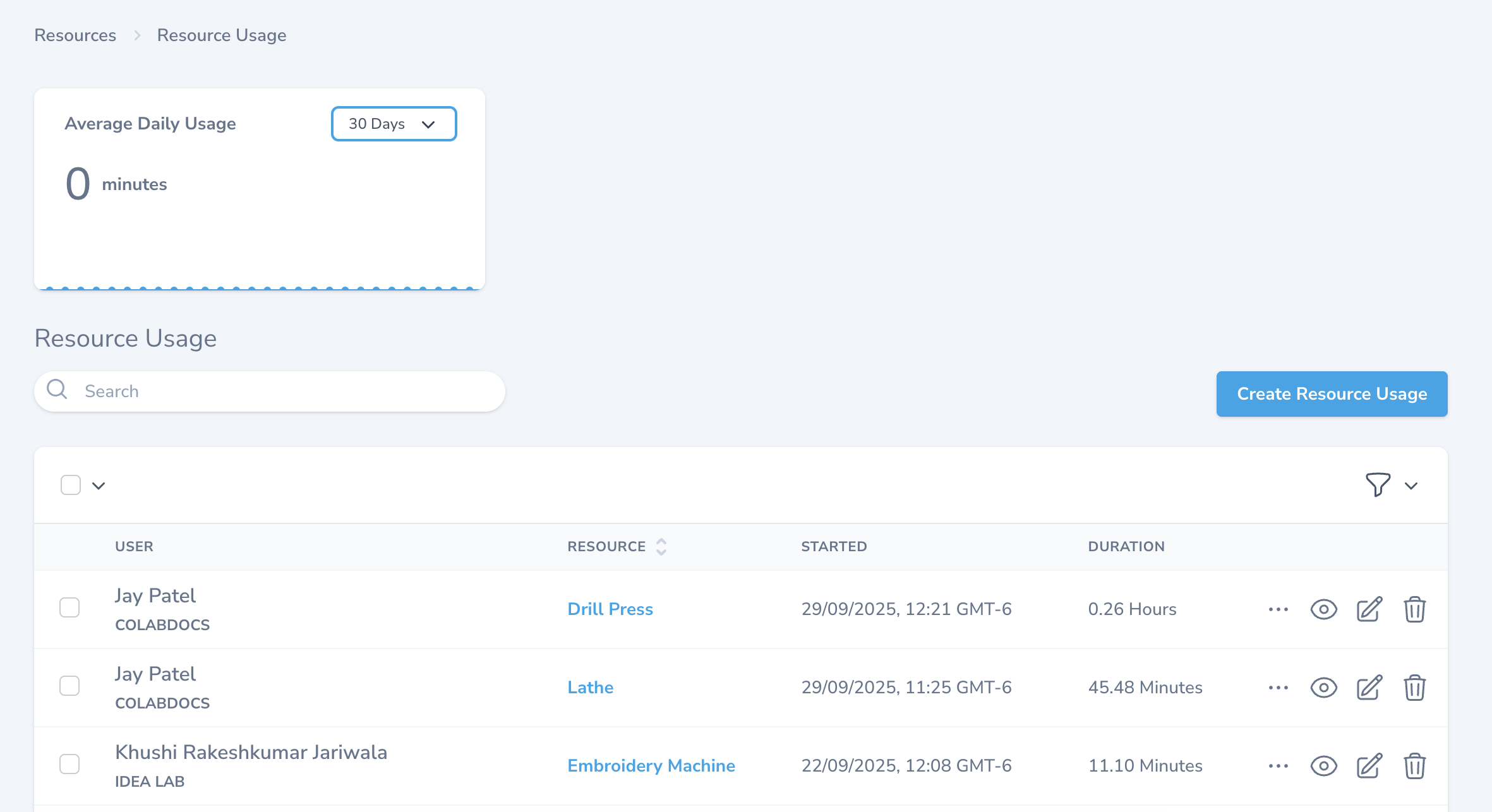
Dashboard:
- Average Daily Usage - Shows average usage in minutes over selected period (30 Days default)
- Trend chart visualization
Table Columns:
| Column | Description | Example |
|---|---|---|
| USER | User name and project | Jay Patel - COLABDOCS |
| RESOURCE | Resource used | Drill Press, Lathe |
| STARTED | Start timestamp | 29/09/2025, 12:21 GMT-6 |
| DURATION | Total time | 0.26 Hours, 45.48 Minutes |
Actions: 👁 View | ✏ Edit | 🗑 Delete
Usage Record Details
Click on a record to view details.
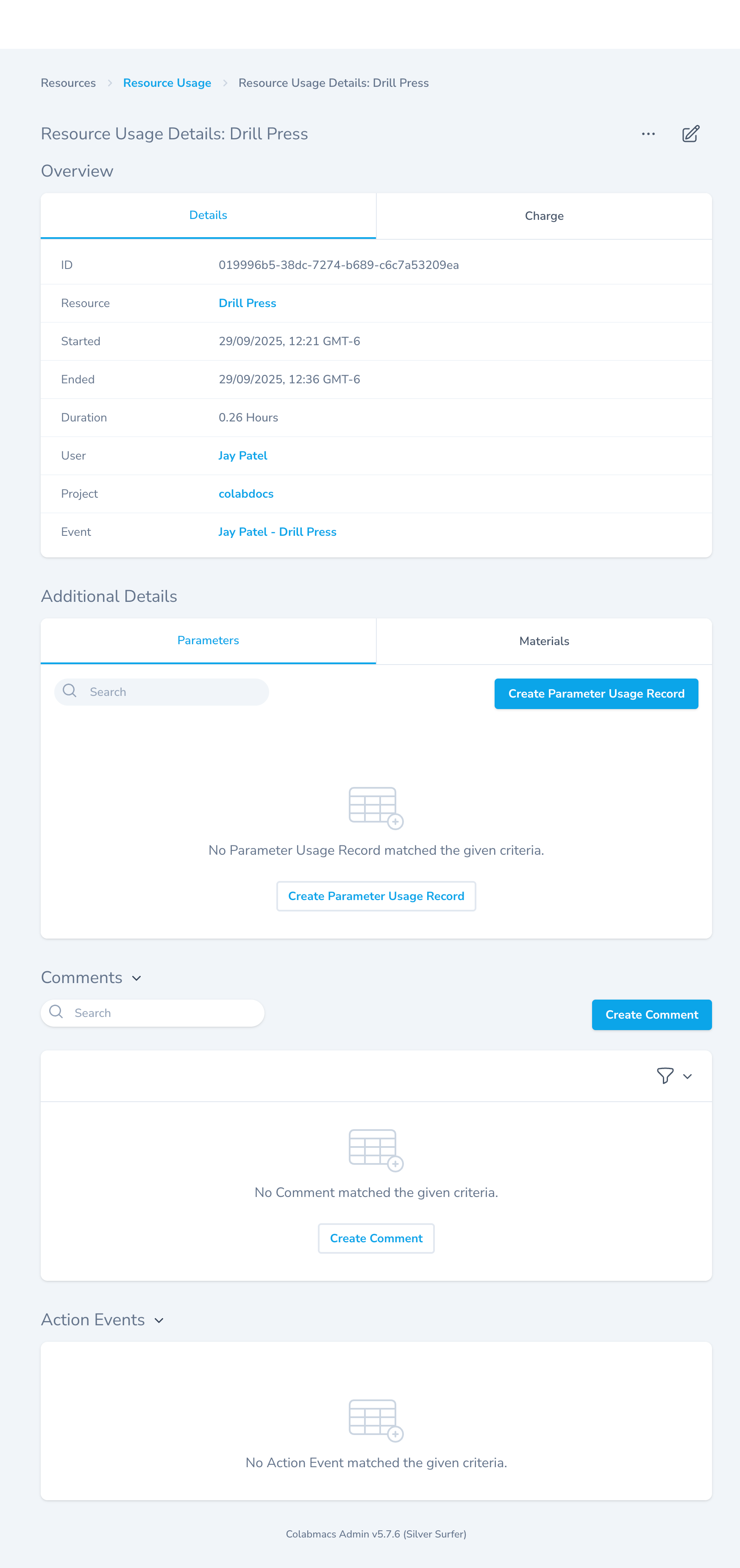
Details Tab:
| Field | Description |
|---|---|
| ID | Unique identifier |
| Resource | Resource used (linked) |
| Started | Start time |
| Ended | End time |
| Duration | Total time used |
| User | User (linked) |
| Project | Associated project (linked) |
| Event | Related reservation (linked) |
Charge Tab:
- View billing information
- Associated charges and rates
Additional Details:
Parameters Tab:
- Track process-specific settings
- Record parameters used during operation
- Click Create Parameter Usage Record
Materials Tab:
- Track materials consumed
- Record quantities
Comments:
- Add notes about usage
- Document issues or observations
- Click Create Comment
Action Events:
- Audit trail of changes
Creating Resource Usage
Click Create Resource Usage.
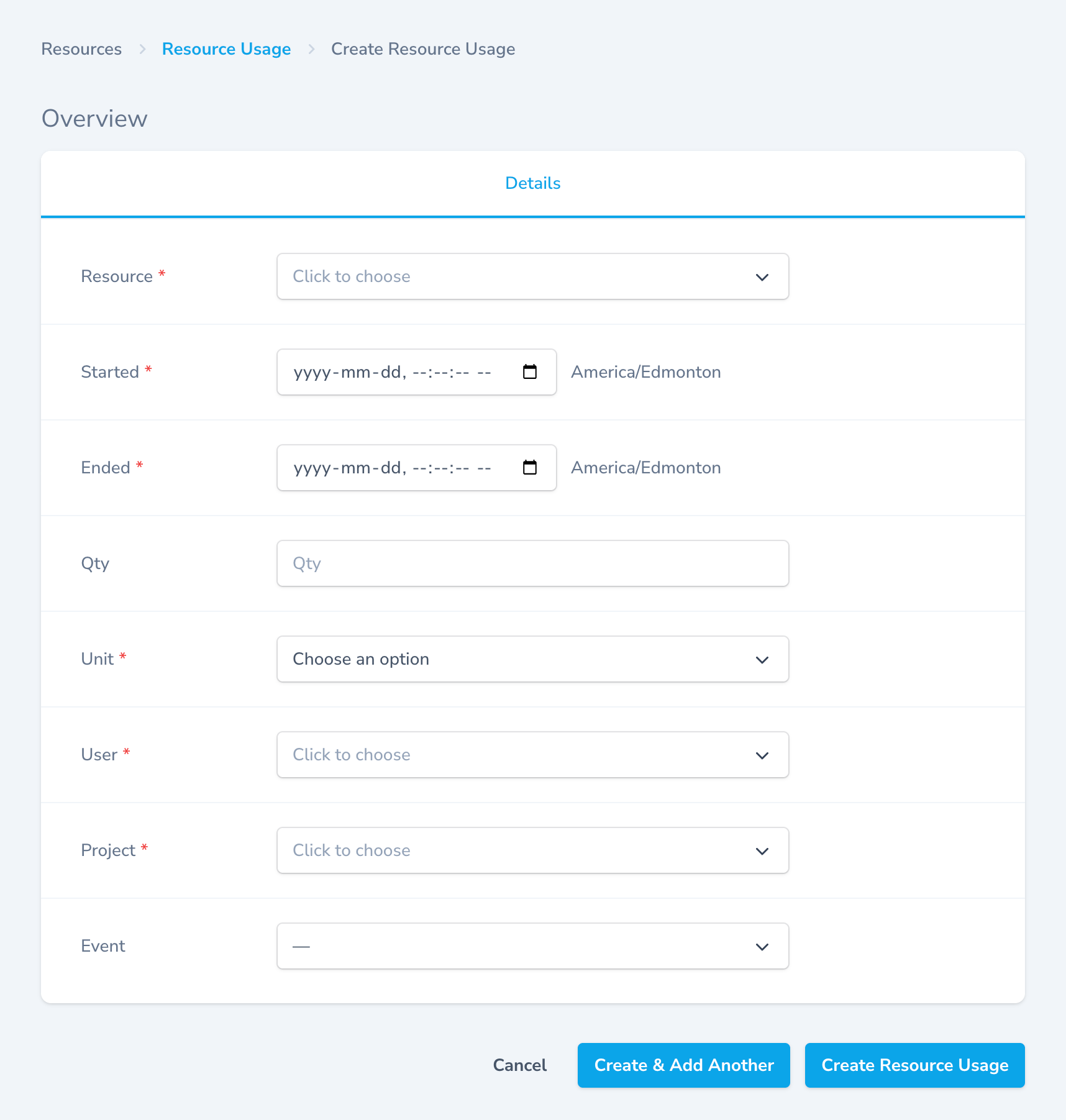
Required Fields
Resource (Required)
- Select resource used
- Dropdown selection
Started (Required)
- Start date/time
- Format:
yyyy-mm-dd, --:--:-- -- - Timezone: America/Edmonton
Ended (Required)
- End date/time
- Must be after start time
Unit (Required)
- Time unit: Hours, Minutes, or Days
User (Required)
- Select user who used resource
Project (Required)
- Select associated project
- Required for charge generation
Optional Fields
Qty - Quantity value for tracking Event - Link to existing reservation
Duration Calculation:
Duration = End Time - Start TimeExample:
Started: 12:21 PM
Ended: 12:36 PM
Duration: 15 minutes
Save Options
- Create Resource Usage - Save and return
- Create & Add Another - Save and create another
- Cancel - Discard
Automatic Usage from Reservations
When users check in/out of reservations:
- User books resource → Reservation created
- User checks in → Start time recorded
- User checks out → End time recorded
- Usage record created automatically
Tracks:
- Scheduled time vs actual time
- Variance (early/late start or end)
- Overage or underage duration
Billing and Charges
Charge Generation Requirements
For charges to generate from usage:
- ✓ Resource must have a Rate defined
- ✓ Rate must be in Rate Group associated with project
- ✓ Usage record must not already have a charge
Charge Calculation:
Charge = Duration × Resource Rate

Example:
Duration: 2.5 hours
Rate: $50/hour
Charge: $125
Note: If no rate exists, no charge is generated.
Usage Import
Important Notes:
- No charges generated during import process
- Only equipment usage is imported
- Usage from inactive projects or users is skipped
- Actual quantity recorded may be large (no adjustment for forgotten logouts)
- Large values may skew analytics
Best Practices
Recording Usage
- Check in/out promptly to ensure accurate times
- Record actual usage, not scheduled time
- Add comments for unusual situations
- Link to correct project for billing
Parameter Tracking
- Record important process parameters
- Document settings for repeatability
- Use consistent naming for parameters
Material Tracking
- Record all consumables used
- Update quantities promptly
- Link to inventory when possible
Billing
- Ensure resources have rates defined
- Verify rate groups are assigned to projects
- Review charges before finalizing invoices
Common Use Cases
1. Manual Usage Entry
Scenario: User forgot to log out

Solution:
- Create usage record manually
- Enter actual start/end times
- Add comment explaining manual entry
2. Process Documentation
Scenario: Track CNC milling parameters

Action:
- View usage record
- Go to Parameters tab
- Create parameter records:
  - Spindle Speed: 3500 RPM
  - Feed Rate: 100 mm/min
3. Material Tracking
Scenario: Record 3D printing filament use

Action:
- View usage record
- Go to Materials tab
- Add material: PLA Filament, 250g
4. Billing Review
Scenario: Review charges before invoicing

Action:
- Filter usage by project
- Check Charge tab on each record
- Verify rates applied correctly